/tower
O.R.B.S. - Operational Relic Bewitching System

scrying lens ................ [ ok ]
ley-line uplink ............. [ ok ]
grimoire index .............. [ ok ]
laboratory .................. [ ok ]
archive ..................... [ ok ]
battlements ................. [ not found ]
menagerie ................... [ not found ]
forge ....................... [ not found ]

the orb warms to your touch.
O.R.B.S.
A wizard stares into his scrying orb and finds a computer terminal inside it.
A text-only game played through a fantasy command line. You tend a wizard's tower by navigating a filesystem that is your duties - then write spells that do the work without you.
- genre
- terminal · idle · roguelite
- built in
- Rust · Bevy
- platforms
- Windows · macOS · Linux
- status
- in development · phase 1 of 9
- store page
- none yet - say hello instead
the loop
- tend
- brew, ward and scry - by typing
- automate
- write spells; the orb works unattended
- descend
- enter a siege, where something clever attacks your automation
Artless by design: no sprites, no illustrations, no key art beyond the screen itself.
laboratory
brewing · /tower/laboratory · built
There is no command that brews a potion.
Five instruments. Brewing is moving material through them - clear one, load it, set it working, collect what it made. One line only makes a potion if you wrote that spell yourself.
stage        instrument           heat      leaves behind
preprocess   mortar_and_pestle    -         husks
process      balneum_mariae       athanor   sediment
combine      flask_and_rod        -         dregs
distil       alembic              athanor   phlegm
(heat)       athanor              -         ash
the fire
The athanor burns fuel the whole time it is lit, and heats two of the five stages. They are not adjacent - so the efficient play is:
light → digest → damp → combine → relight → distil
Getting it wrong costs fuel, never progress. A spell that damps the fire is simply cheaper than you are.
archive
research · /tower/archive · built
Every command in the game is found, then understood, then used.
You begin with two verbs. The rest are fragments recovered from sieges and hidden directories, carried back here and deciphered.
orbs:~/archive$ decipher fragment_0x1f

  the sigil resolves. it is a sieve - it lets
  through only what matches, and holds back
  the rest.

  learned: sift

  the grimoire grows.
Shell verbs, domain verbs, conditionals, loops and triggers all unlock on this one track.
grimoire
spellcraft · /grimoire · being built now
A spell is not kept in a room. It is a book you carry.
orbs:~/grimoire$ cat night_watch.spell
#!/orbs/invoke
# runs each dusk

ward --upon north_gate --strength 3
invoke brew_clarity --qty 2
purge --byproduct --above 60%

if scry --enemy --within 2leagues; then
    ward --upon all --emergency
fi

orbs:~/grimoire$ bind night_watch.spell --to dusk
Bound. The orb will remember.
brew_clarity is a spell you wrote, not a command the game ships. Spells calling spells is the beat between automating one chore and a tower that runs itself.
why automation wins
- Some things cannot be done by hand at all - triggers you cannot sit and watch for.
- A manual action holds its pane for the whole duration. A spell does not.
- The orb is simply faster at it than you are.
and why that is dangerous
A bound spell runs unattended, on inputs it never questions. A siege does not out-damage you - it poisons what your spells read.
manual
how to play · /recall/manual · covers the current development build
You are a wizard with a scrying orb, and inside the orb is a terminal. Everything you do, you do by typing at it. There is no mouse, no menu, and no button that brews a potion for you.
This page is the same manual the orb carries. In the game you reach it with
recall - bare, it lists every word that works where you stand; given a word, it
opens that word's page.
the prompt
Type a line, press enter, read what comes back. That is the whole interface.
The parser is built to forgive phrasing rather than to test your memory. It resolves what you meant, then writes down what it understood - so a command that went somewhere unexpected tells you where it went and why, instead of failing silently.
- abbreviation works.
att labreachesattend laboratory.grimreaches the grimoire. - word order is not a puzzle. The orb reads for intent, not for a fixed argument list.
- tab completes, and the arrows walk your command history.
- speed buys nothing. No mechanic anywhere requires fast typing. A slow typist is not a worse wizard.
When the orb does not understand, it says what it tried, not just that it failed.
finding your way
The tower is a filesystem, and the filesystem is your duties. Moving through it is the primary navigation.
| word | use | does |
|---|---|---|
attend |
attend <place> |
go somewhere in the tower |
survey |
survey [place] |
list what is here, or what is there |
peruse |
peruse <file> |
read a file or a spell |
sift |
sift <pattern> <file> |
keep only the lines that match |
verify |
verify <name> |
check something for tampering |
survey is the one to reach for first in an unfamiliar room. It tells you what
is here; recall then tells you what you can do to it.
the tower
Your rooms hang below /tower. /grimoire is a sibling, not a child - a
spell is a book you carry, not a shelf you walk to.
| place | what it is |
|---|---|
/tower |
your tower. the rooms are below you, and no work happens up here |
/tower/laboratory |
where reagents become potions, one instrument at a time |
/tower/archive |
shelves that run further than they should. things are lost here |
/tower/lens |
another wizard's orb, sealed with four sigils of six |
/tower/sanctum |
where you ward the tower. the barrier fades while you work |
/grimoire |
where your spells are kept. no work happens here either |
/arsenal |
finished work, kept where every room can reach it |
the work
Every room has words of its own. They only mean something where their instrument
stands - grind is the mortar's word and says nothing in the sanctum.
the laboratory
Five instruments and a fire. Brewing is moving material through them: clear one, load it, set it working, collect what it made.
| stage | instrument | heat | leaves behind |
|---|---|---|---|
| preprocess | mortar_and_pestle |
- | husks |
| process | balneum_mariae |
athanor | sediment |
| combine | flask_and_rod |
- | dregs |
| distil | alembic |
athanor | phlegm |
| (heat) | athanor |
- | ash |
kindle <reagent>- light the athanorgrind <reagent>- crush a reagent in the mortardigest <reagent>- steep a reagent in the water bathmix <reagent> with <reagent>- combine two reagents in the flaskdistil <reagent>- draw a potion off in the alembicmove <reagent> to <place>- carry something from one place to anotherwield <place>- set an instrument workingempty <place>- turn an instrument out into the store
The athanor burns fuel the whole time it is lit and heats two of the five
stages - and those two are not adjacent. So the efficient play is
kindle → digest → damp → combine → relight → distil. Getting the order wrong
costs fuel, never progress.
recall clarity walks a whole brew end to end, naming each step and what it
leaves behind. That is usually faster than reading this table.
the archive
Every command in the game is found, then understood, then used. You begin with two verbs; the rest are fragments recovered and deciphered here.
research- open a way into the stackswander- walk the stacks by hand, with the arrows.escgives the prompt back, and a step costs the tower no time at allfollow <way>- move the reading one square
Reach the way out for a fragment. Four in the lectern, then wield it.
the lens
Another wizard's orb, sealed with four sigils of six.
dial <socket> [<sigil>]- turn one dial of the apertureprobe- press a figure against a far orb's seal
Both are free. aligned counts the sigils in the right socket; astray counts
the misplaced.
the sanctum
Where you ward the tower. The barrier fades while you work, so this room is a race against your own upkeep.
muster- draw a fresh course of wards up out of the wellspringhaul <station> to <station>- carry the topmost ward from one station to another
Haul them all to the barrier, and never a ward onto a lesser one.
spells
A spell is a text file you write yourself. This is the game's real progression: you are not buying bigger numbers, you are teaching the orb to do your job.
scribe <name>- write a spell. A spell is written where its work is, so attend the room firstbind <script>- have the orb hold a spell, and run it on a triggerinvoke <script>- cast a spell once, where you standweave- look at what the work has bought
orbs:~/grimoire$ cat night_watch.spell
#!/orbs/invoke
# runs each dusk

ward --upon north_gate --strength 3
invoke brew_clarity --qty 2
purge --byproduct --above 60%

if scry --enemy --within 2leagues; then
    ward --upon all --emergency
fi
Spells can call spells. brew_clarity above is one you wrote, not a command the
game ships - and that is the beat between automating one chore and a tower that
runs itself.
Why automate at all:
- Some things cannot be done by hand. A trigger you would have to sit and watch for is not something a person can hold.
- A manual action holds its pane for its whole duration. A bound spell does not.
- The orb is simply faster at it than you are.
And why that is dangerous. A bound spell runs unattended, on inputs it never
questions. Later in the game something arrives that does not out-damage you - it
poisons what your spells read, so a perfect spell does the wrong thing perfectly.
verify is the authoritative detector, on every surface and every frontend.
asking the orb
| word | use | does |
|---|---|---|
status |
status |
how the tower stands |
recall |
recall [topic] |
ask the orb what it knows |
unfurl |
unfurl |
read back through the record |
undo |
undo |
take back the last command |
meditate |
meditate <count> |
let the tower run without you |
weave |
weave |
look at what the work has bought |
quit |
quit |
put the orb down and stop |
status enumerates everything in flight. When you have a dozen things working at
once, it is the one command worth typing on reflex.
meditate is how an idle game passes time on purpose: the tower runs, your bound
spells fire, and you come back to what they made.
careful
Two words destroy something, and the orb treats them differently for it.
stop <place>- halt what is running. Work in progress is lostpurge <name>- destroy something
Catastrophic targets are protected in character rather than by a confirmation dialog. The tower itself will not let you purge it.
keys
Almost everything is typed. These are the exceptions.
| key | does |
|---|---|
F2 |
cycle the phosphor theme |
F3 |
cycle the CRT effect, including fully off |
F4 |
switch focus mode - deep or wide |
F5 |
toggle the linear text stream |
F7 |
cycle the tonal register |
F10 |
quit |
F12 |
screenshot |
PageUp / PageDown |
scroll the record |
↑ / ↓ |
walk your command history |
F10 rather than Escape is deliberate: the moment there is a text field,
Escape is "clear the line" muscle memory, and quitting mid-sentence is not a
recoverable surprise.
saving
The game saves itself. There is no save verb, and you will never be asked
whether you want to.
The world is written to orbs-save.toml beside the game's executable, about once
a minute and on quit. If that file cannot be written - an install directory that
is read-only, say - the game says so once and carries on rather than failing
quietly every minute for an hour.
Point ORBS_SAVE at another path to keep the save somewhere else, or set
ORBS_SAVE=off to play a session that persists nothing.
a note on where this is
O.R.B.S. is in development - phase 1 of nine. Four domains exist and three do not; the siege, which is the second half of the game, has not been built yet. This manual describes what is there now, and grows as the game does.
the siege
the second half of the game · /siege · not yet built
Urgency is consensual. The tower is safe; a siege is something you walk into.
Real-time, and genuinely losable. Your bound spells fight as an autobattler while you diagnose and repair under pressure.
- why go
- The only source of certain reagents, fragments, and knowledge of your enemy.
- what you keep
- Scales with how far you got. Farm the easy opening and bail, and you earn little.
- what attacks
- Not a bigger number - a log that is subtly wrong, so a perfect spell does the wrong thing perfectly.
screens
captured from the running game, never mocked up
There is no key art. The screen is the art.
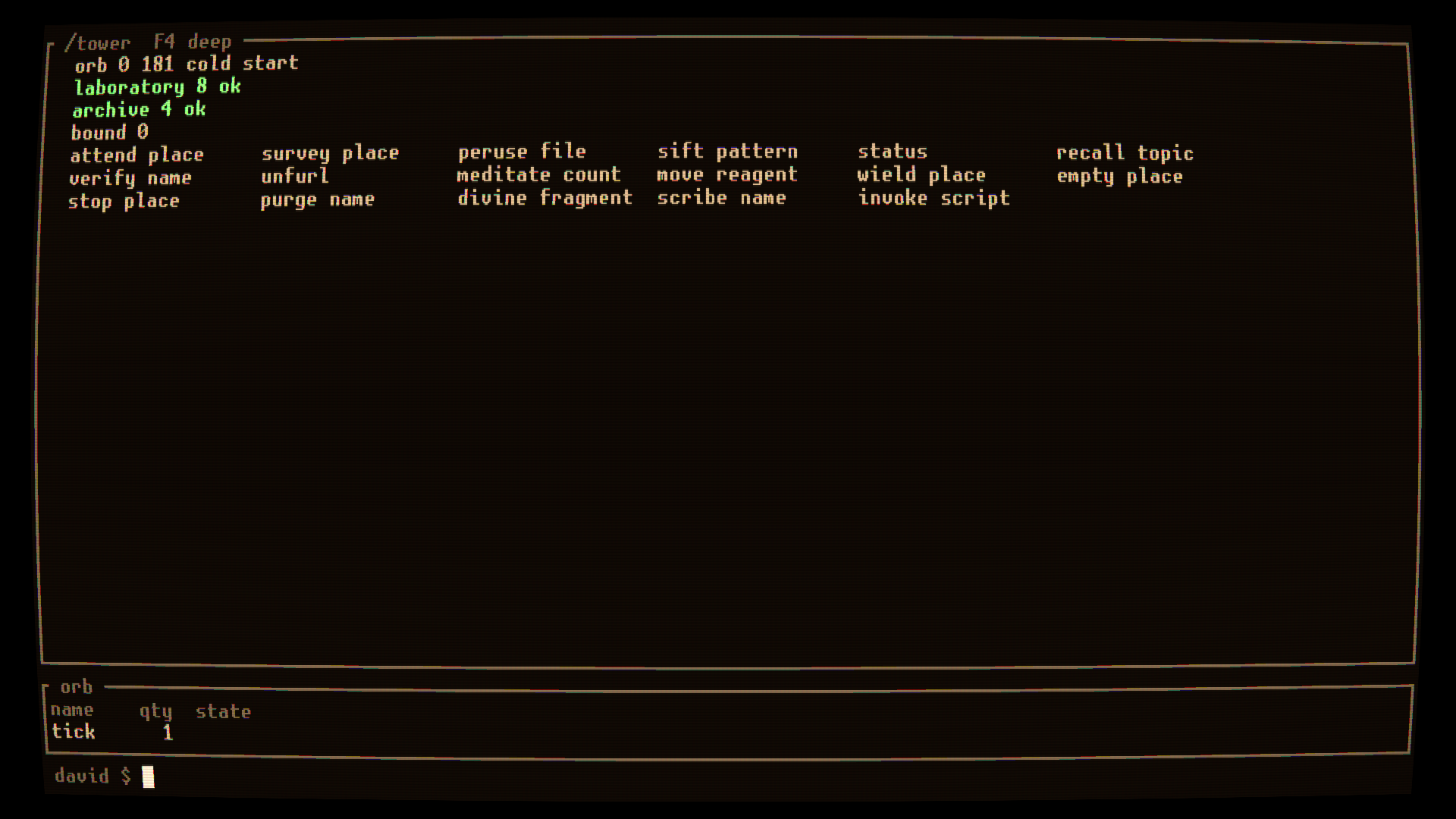
the tower at cold start. Two domains found, five still undiscovered, and every verb the orb knows so far. The bow in the borders is the game's CRT shader.
the same frame, as text
The game can print any frame as text through the same painter that draws it - here at an 80×22 grid.
┌ /tower  tick 0  tier 1  80x22  wide  F4 deep ────────────────────────────────┐
│  orb 0 181 cold start                                                        │
│  laboratory 8 ok                                                             │
│  archive 4 ok                                                                │
│  bound 0                                                                     │
│  attend place     survey place     peruse file      sift pattern             │
│  status           recall topic     verify name      unfurl                   │
│  meditate count   move reagent     wield place      empty place              │
│  stop place       purge name       divine fragment  scribe name              │
│  invoke script                                                               │
│                                                                              │
└──────────────────────────────────────────────────────────────────────────────┘
 david $
More arrive as the domains do.
roadmap
solo · commercial · demo first, then 1.0 - no early access
phase                     status
0.  vertical slice        closed
0.5 interlude             closed
1.  core loop             in progress
2.  siege                 -
3a. breadth               -
3b. remote hosts          -
3c. engine upgrade        -
4.  onboarding + demo     -
5.  ship                  -
- done
- Parser, cell renderer, CRT, boot, and the two starting domains.
- now
- World clock, script engine, failure taxonomy, sabotage, balance.
- next
- The siege.
Phase 0 set itself a gate: eight outside testers, 85% of inputs reaching the intended action first try. It has not been run - deferred rather than passed, because there are no external testers yet and the author cannot stand in for one.
pillars
what every decision is checked against
- 1
- The terminal is the fantasy, not a UI.
- 2
- Understanding beats memorisation. The parser forgives phrasing.
- 3
- Automation is progression - and automation is attack surface.
- 4
- Urgency is consensual.
- 5
- Everything converges in the siege.
what this is not
- Not a Linux tutorial. Terminal literacy helps, and is never required.
- Not a typing game. Speed buys nothing.
- Not illustrated.
- Not multiplayer.
battlements
defence · /tower/battlements · not yet built
Walls, gates and wards - where a siege lands, and where the automation you wrote in calmer hours either holds or does not.
lens
scrying · /tower/lens · not yet built
Feeds, logs, intelligence. Scrying is deduction: parse noisy output and find the truth someone hid in it.
This is the room that catches sabotage - spacing that drifted, an alignment that slipped, a record malformed in a way no machine would produce.
menagerie
summoning · /tower/menagerie · not yet built
Familiars and constructs. Spend resources, get something that fights on its own - whether or not that is still a good idea.
forge
enchanting · /tower/forge · not yet built
Imbuing items and wards: a sequence and a cost, for something that stays true after you stop paying attention.
about
- made by
- Blackhearth Games - David Yurek, solo
- status
- In development. Phase 1 of nine.
- built with
- Rust and the Bevy engine
- platforms
- Windows, macOS, Linux
- licence
- GPL-3.0-or-later - built in the open
- contact
- [email protected]
No store page yet. When there is one, it will be here.
credits
- typeface
- unscii-16 by Viznut, public domain - the face the game renders its cell grid from.
- colours
- The game's own four phosphor themes, converted from its source.
- source
- MIT · github.com/millidavids/orbs_website
the long documents
- manual
- how to play - the same manual the orb carries
- health
- health & safety - the CRT, the flicker, and the switch that turns it off
- privacy
- privacy policy - what the game and this site store, which is almost nothing
The short version: no cookies, no analytics, no trackers, no third-party scripts, and no networking code in the game at all. Your phosphor choice lives in your own browser and is never sent anywhere.
health & safety
Draft - pending legal review. Please read before playing.
photosensitive seizure advisory
A very small number of people may experience a seizure when exposed to certain visual images, including flashing lights or patterns that may appear in video games. Even people who have no history of seizures or epilepsy may have an undiagnosed condition that can cause these "photosensitive epileptic seizures" while watching video games.
These seizures may have a variety of symptoms, including:
- Lightheadedness, altered vision, eye or face twitching
- Jerking or shaking of arms or legs, disorientation, confusion
- Momentary loss of awareness or loss of consciousness
- Convulsions
Stop playing immediately and consult a doctor if you or anyone else experiences any of these symptoms. Parents should watch for or ask their children about these symptoms - children and teenagers are more likely than adults to experience these seizures.
reducing the risk
You can reduce the risk of photosensitive epileptic seizures by:
- Sitting farther from the screen
- Using a smaller screen
- Playing in a well-lit room
- Not playing when you are drowsy or fatigued
If you or any of your relatives have a history of seizures or epilepsy, consult a doctor before playing.
O.R.B.S. specifically
O.R.B.S. is a text-only game. There are no sprites, no particle effects and no explosions - the screen is a grid of glyphs, and most of what happens on it is text arriving a line at a time.
What the game does draw over that grid is a CRT simulation: barrel distortion, scanlines, an aperture grille, vignette, a slight colour fringe at the edges, and a dim phosphor bloom around lit glyphs.
Two of those deserve naming directly.
The hum band is slow and spatial, on purpose. Old tubes have a faint band that rolls down the picture. Modulating the whole screen at CRT frequencies would land squarely in the photosensitive band, so the game does not do that: the band is a moving position on the screen rather than a brightness the whole screen shares, and it moves slowly. This was a design constraint, not a tuning afterthought.
The barrel distortion curves straight lines. The game's panes are drawn with box-drawing characters, and the tube bows them. Some people find that curvature uncomfortable, in the same way some people find a wide field of view uncomfortable.
All of it can be turned off. Press F3 to cycle the CRT effect, including
fully off, which leaves a flat panel of plain text. This is a real switch: it
disables the whole pass rather than turning the individual effects down, so
nothing in the game can quietly bring it back. Accessibility settings in the
options screen do the same thing without a keypress.
The game reserves a screen flash for one future event - a breach during a
siege. The siege is not built yet, so no build available today flashes the screen
at all. When it ships it will be covered by the same F3 switch and by its own
option, and this page will be updated to say so precisely.
Four phosphor themes are available (F2): amber, green, muted violet, and
monochrome. If one of them is harder on your eyes than the others, use another -
no theme is mechanically advantaged, and no meaning in this game is carried by
colour alone. Every coloured tell also has a glyph or a word.
eye strain and fatigue
O.R.B.S. is a reading game. You will spend more continuous time looking at small text than you would in most games, which makes the ordinary advice more relevant here rather than less:
- Take a 10–15 minute break every 30–45 minutes of play
- Sit at a comfortable distance from the screen - about arm's length
- Adjust the brightness of your display so it is not too bright or too dim
- Increase the game's font size and cell scaling rather than leaning in
- Avoid playing when you are tired or need sleep
The phosphor themes are low-contrast against a dark background by design. If that is hard to read for you, raise the contrast in the options screen or switch to the monochrome theme, which is the highest-contrast of the four.
If persistent pain or discomfort continues, consult a doctor.
repetitive strain
O.R.B.S. is played almost entirely by typing. To avoid repetitive strain injuries:
- Keep your wrists in a neutral position and your keyboard at a height that does not make you reach up to it
- Stretch your hands, wrists and fingers regularly
- Take breaks away from the keyboard, not merely between rooms
- Stop playing at the first sign of pain, numbness or tingling
No mechanic in the game requires fast typing, at any difficulty. Nothing is
scored on words per minute, nothing is lost by typing slowly, and every command
can be abbreviated or completed with tab rather than typed out. If you find
yourself hurrying, the game is not asking you to.
stop playing and consult a physician if you experience
- Convulsions, eye or muscle twitching, loss of awareness
- Altered vision or involuntary movements
- Disorientation or dizziness
- Any pain, numbness, tingling or weakness in your hands, wrists, arms, neck, shoulders or back
emergency
If someone experiences a seizure, keep them safe by moving nearby objects away, do not restrain them, and seek medical help immediately.
privacy policy
Draft - pending legal review.
Effective date: 2026-08-26
Last updated: 2026-08-26
summary
O.R.B.S. is developed by Blackhearth Games. We do not operate any servers that collect your personal data. We do not use third-party analytics, advertising, or tracking services. The game has no networking code in it at all - everything it does, it does on your own computer.
This website collects nothing either. No cookies, no analytics, no trackers, no third-party scripts.
what the game stores locally
O.R.B.S. writes its world to a single file, orbs-save.toml, kept beside the
game's executable. It holds the state of your tower: the world clock, the rooms
and what is in them, what you have researched, the spells you have written, and
your settings.
It contains no personal information. It does not record your name, your machine, your network, or anything about you that you did not type into the game yourself.
You control where it lives, and whether it exists:
- Set the
ORBS_SAVEenvironment variable to a path to keep the save somewhere else. - Set
ORBS_SAVE=offto play a session that persists nothing at all. - Delete the file at any time to remove everything stored locally. Doing so resets your tower.
The save location is deliberately simple while the game is in development. When the game reaches Steam it will move to your operating system's standard application data directory, and this policy will be updated to name those paths before that change ships.
the parse trace
Pressing F6 writes a trace of the commands you have typed and how the parser
read them to a file on your own computer. It exists so that a confusing parse can
be looked at afterwards, by you.
It is written only when you press the key, only to your own disk, and it is never transmitted anywhere. If you send us one - attached to a bug report, say - we receive it because you chose to send it, and it is then handled as ordinary support correspondence.
no networking, no telemetry
O.R.B.S. does not connect to the internet. This is a stronger claim than "we don't collect anything", and it is checkable: the game's dependency manifests contain no HTTP client, no socket library, no crash reporter, no analytics SDK, and no telemetry of any kind. The game is open source under GPL-3.0-or-later, so you do not have to take our word for it.
There is no multiplayer, so there is no peer-to-peer networking, no matchmaking, and none of the IP-address exposure that comes with direct player-to-player connections. O.R.B.S. is a single-player game and is designed to stay one.
steam
O.R.B.S. is intended to release on Steam. It is not on Steam yet, and no build available today contains any Steam integration.
When it does, playing through Steam will interact with Valve's Steamworks APIs for the usual platform features - achievements, statistics, and Steam Cloud saves if you enable them. That data will be handled by Valve under Valve's own privacy policy. Blackhearth Games would receive only anonymous aggregate statistics, never personally identifying information. This section will be rewritten with specifics before any such build is published.
this website
orbs.blackhearthgames.com is a static site. It sets no cookies, runs no analytics, loads no third-party scripts, embeds nothing, and makes no requests to any other host - a Content-Security-Policy header on every response enforces that.
The one thing it remembers is your phosphor theme, stored in your own browser's local storage so the site looks the same when you come back. It never leaves your browser and is never sent to us.
The site is hosted on Cloudflare Pages. Cloudflare processes standard web server request logs on our behalf as a hosting provider; we do not query, export, or analyse them.
children's privacy
O.R.B.S. is not directed at children under 13. We do not knowingly collect personal information from children. Because we do not collect personal information from anyone, no special data-handling procedures for children are required.
your rights (GDPR / CCPA)
Under the EU General Data Protection Regulation and the California Consumer Privacy Act, you have the right to access, correct, delete, and port the personal data held about you, and to object to its processing.
Because all of your O.R.B.S. data is stored locally on your own computer, you can exercise all of these rights yourself by reading, editing, or deleting the save file described above. The save is plain TOML - you can open it in any text editor. Blackhearth Games holds no copy of your personal data that you would need to contact us to retrieve or erase.
changes to this policy
We may update this policy from time to time. The "Last updated" date above will reflect the most recent change. Material changes will be announced in the game's changelog and on this website.
contact
If you have questions about this privacy policy, contact us at [email protected].